

Content clusters are one of the most popular ways to improve your website’s topical authority. They’re also poorly understood and frequently abused.
In this article, I’ll explain exactly what a content cluster is, how they improve your organic search performance, and how you can start creating your own. If you’ve ever struggled to explain to stakeholders why clusters matter so much for SEO, this is the resource you need.
What Exactly Is a Content Cluster?
A content cluster, also known as a topic cluster, is a group of topically related content assets. Typically, those assets are long-form articles published on a website, although other formats – such as video content clusters on YouTube – can and do exist.
A content cluster is defined by traits such as:
- a mutually exclusive, collectively exhaustive (MECE) approach to sub-topic division
- a rooted tree structure, with a ‘pillar’ root asset and ‘satellite’ child assets
- a high degree of cross-referencing between assets, often in the form of internal links.
Let’s break that down with a visual example.
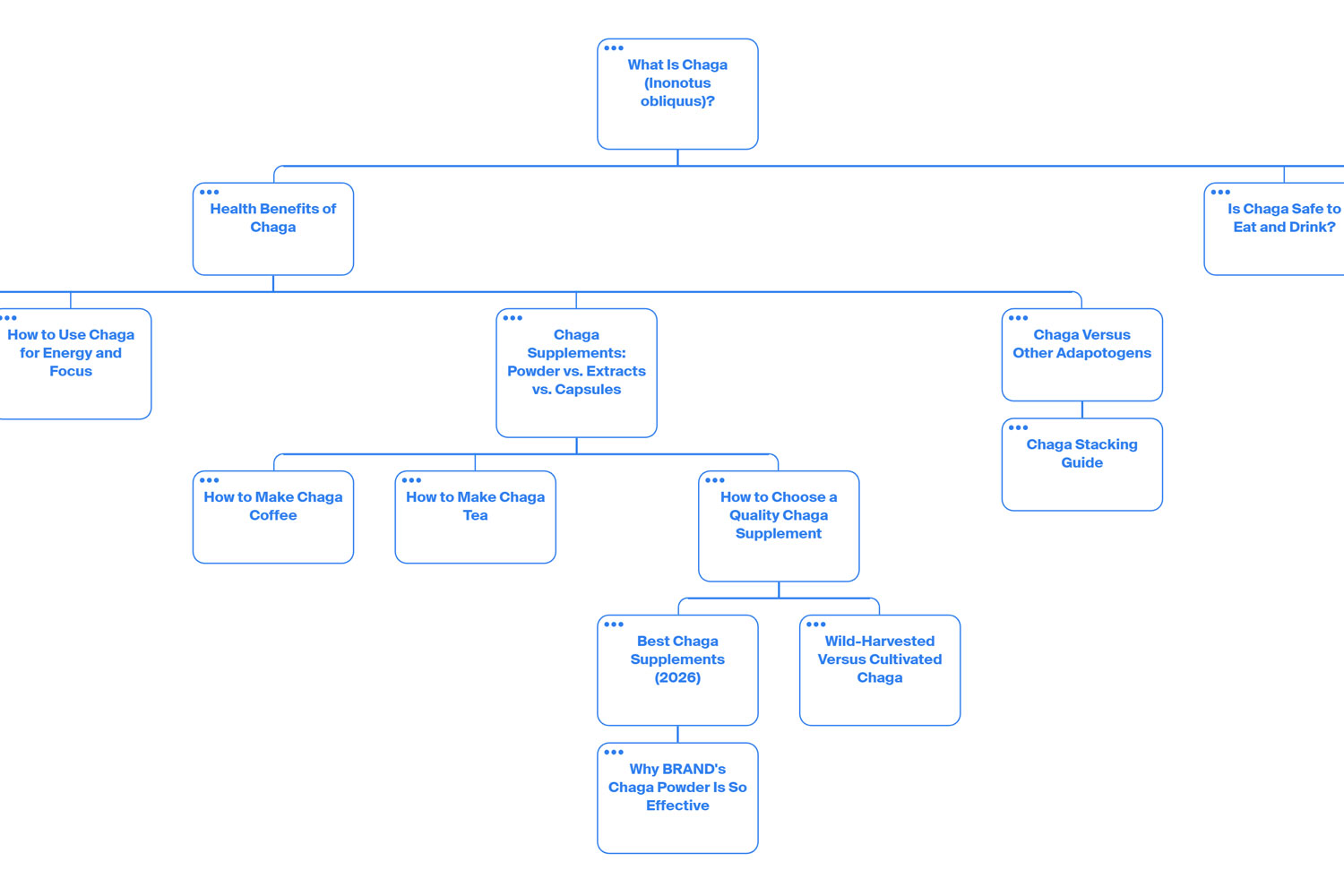
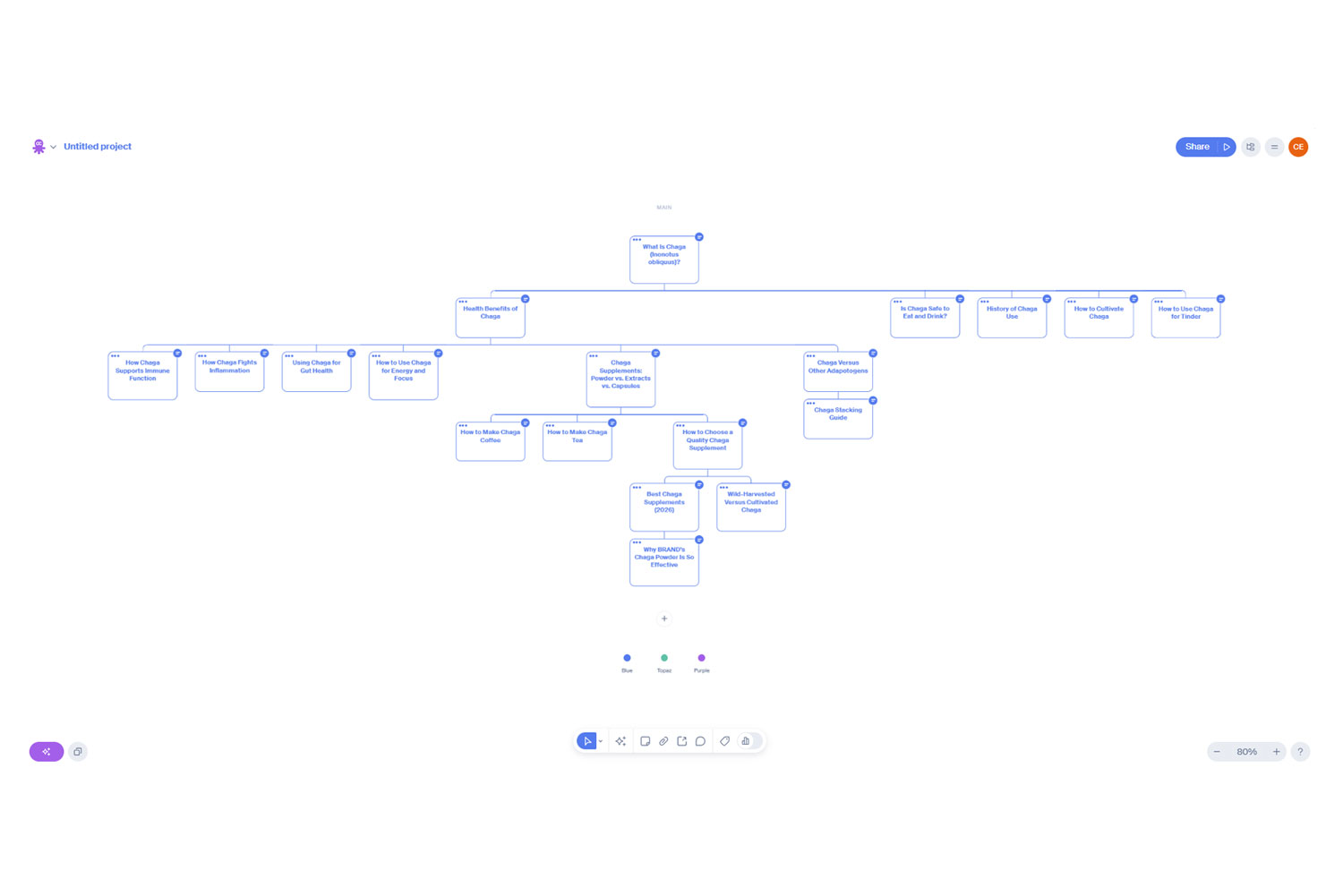
This is a hypothetical content cluster for chaga, an adaptogenic fungus that has a number of health benefits. The pillar asset is the ‘What Is Chaga?’ asset – this would be a broad, lengthy article covering all aspects of chaga as an entity. (For reference, look at the Wikipedia page for Inonotus obliquus; it touches on everything from chemistry to etymology, without going into a great deal of detail on any single sub-topic.)
That pillar asset has one child branch – the health benefits of chaga – which diverges into a further 2 sub-branches, each covering a different aspect of health-related consumption.
The further down the tree an asset is, the more specific and detailed it is. At a certain point, a sub-topic branch will culminate in one or more ‘leaves’ – assets that have exhausted the sub-topic in question as much as reasonably possible. In this particular example, the content cluster has 13 leaves.
Now, this content cluster is relatively small for one reason: it covers all the chaga-related topics that could be relevant to a consumer of chaga products. If someone was developing a content cluster for chaga farmers, though, it would likely be vastly more detailed – we could expect topics covering everything from the dowel implantation process to the chaga growth cycle.
Key Definitions
Content Cluster: A group of content assets that cover different aspects of a single topic. A content cluster normally has a rooted tree structure. Synonymous with ‘topic cluster’ and ‘hub-and-spoke model’.
Pillar Asset: A content asset that covers the overall topic of its cluster in a broad, high-level way. Each cluster can only have one pillar asset.
Satellite Asset: Any content asset in a cluster other than the pillar asset. Satellite assets should increase in specificity with each subsequent level.
Root: The content asset that forms the foundation or centre of your cluster. Synonymous with ‘pillar asset’.
Branch: A group of two or more satellite assets that covers a specific sub-topic. Branches terminate in leaves.
Leaf: A satellite asset that has no children. Leaves generally cover highly specific sub-topics.
How Content Clusters Improve Search Performance
Content clusters are almost exclusively recommended for organic search purposes. But why? How does building a cluster actually get you found more effectively than, say, covering a collection of semi-related, customer-relevant topics?
siteFocusScore
The answer lies mostly in an obscure Google metric called siteFocusScore. Leaked in 2024 from the search giant’s Content Warehouse API, siteFocusScore evaluates how closely a website sticks to a given topic. It’s closely related to 3 other attributes:
- pageEmbedding (which calculates the main topic for a single page)
- siteEmbedding (which calculates the main topic for the whole site)
- siteRadius (which calculates how related a single page’s main topic is to the site’s main topic).
A site with a good focus score is one with pages that are semantically close to the main site topic. Google views that site as an expert in its topic – and is more likely to surface it for related queries.
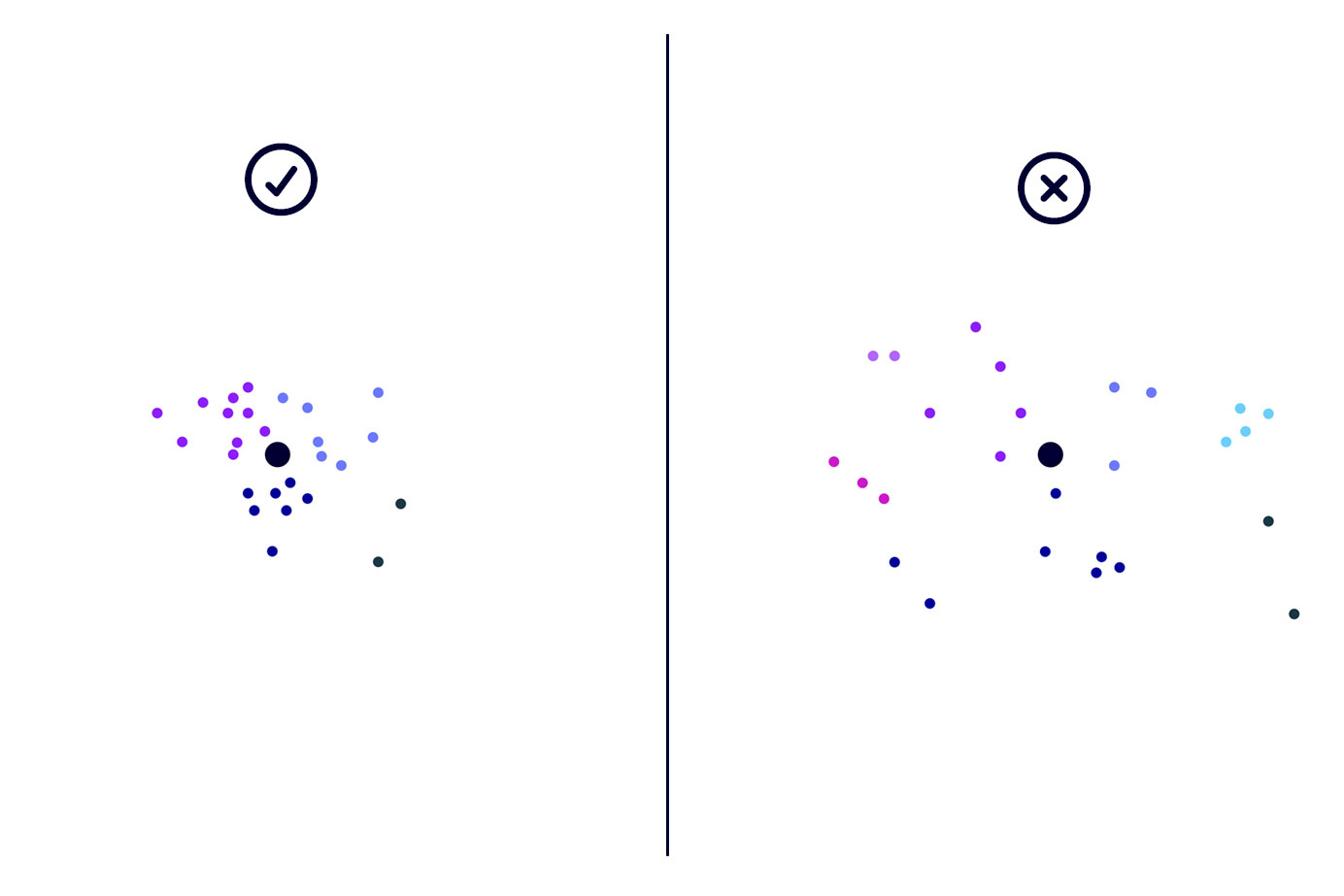
A content cluster built around your website’s main topic improves siteFocusScore by moving your siteEmbedding closer to the semantic centre of that topic. That, in turn, improves siteRadius for core pages, lifting their performance – and delivering a much more tightly focused site.
Related Entity Coverage
Content clusters also improve search visibility by comprehensively covering all aspects of a topic. That doesn’t necessarily improve page performance for a given search term per se, but it does make it much more likely that you’ll be surfaced.
The exact mechanics – in traditional Google search – hinge on an attribute called relatedEntity. In search, an entity is a distinct concept, such as a person, place, idea, event or object. Google maps those entities and how they relate to each other in Knowledge Graph, a vast database with more than 54 billion entities.
When a search is conducted, a system called QRef annotates the query against Knowledge Graph entities. That annotation then informs the kind of websites that will be returned as search results. Often, though, user intent isn’t perfectly aligned with the query that’s entered into Google – for example, ‘corolla hatch’ could refer to any number of given Corolla hatchback models, all of which are different entities in Knowledge Graph.
As such, QRef looks at attributes such as the semantic cluster a given entity belongs to (clusterID), its ‘sibling’ entities in the same cluster (clusterSiblingMid), and related entities (relatedEntity), which are entities that have a direct relationship with the entity in question. ‘Corolla hatch’, for example, might be tentatively annotated against the 2019 Toyota Corolla, which would be a part of the Corolla subcluster and the broader Toyota car make entity. To better satisfy user intent, QRef would likely annotate other Corolla models as cluster siblings and, possibly, related entities.
It isn’t clear exactly why QRef annotates related entities. It’s possible that its sister system, WebRef, which entity-matches pages against the annotated query, prefers pages and/or sites that cover both the entity and its relations. Alternatively, it could be the case that – depending on the type of relation – that results for both the entity and certain relations are returned (potentially when the entity annotation has a low confidence score); relatedEntity attributes could also purely be used to feed into SERP features such as ‘People also search for’.
In any case, a content cluster will almost certainly improve your chances of showing up for queries in some way, shape or form.
Query Fan-Out
Related entities matter in traditional search, but they’re also highly relevant for AI SEO. When an AI chatbot like Gemini or Claude encounters a query that requires RAG, it won’t necessarily search that exact string against whatever search index it’s using. Instead, it decomposes it into multiple sub-queries (‘query fan-out’), a technique that’s designed to produce more helpful, comprehensive answers.
For example, the search term ‘corolla hatchback’ might be decomposed into queries such as ‘Toyota Corolla hatchback specs and features’, ‘2026 Corolla hatchback price and trim levels’, and ‘Corolla hatchback vs Honda Civic hatchback comparison’.
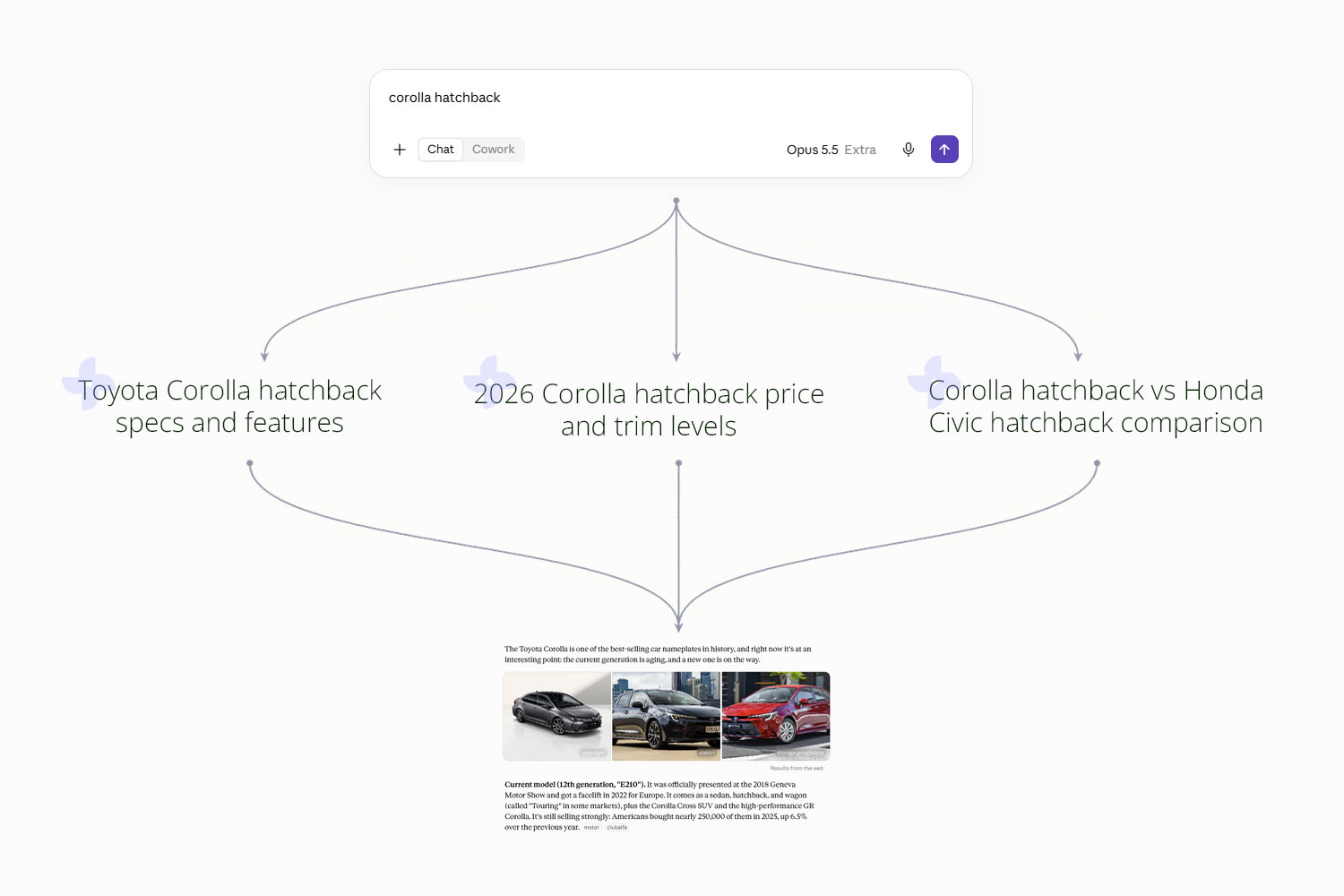
Immediately, it should be obvious why content clusters matter: each of those sub-queries would probably be addressed by articles in a Corolla cluster, which significantly improves your site’s chance of getting cited or directly referenced.
onsiteProminence
onsiteProminence is another attribute surfaced in the Google Content Warehouse API leak. Per Google:
Onsite prominence measures the importance of the document within its site. It is computed by propagating simulated traffic from the homepage and high craps click pages. It is a 13-bit int.
‘High craps click pages’ refers to pages with positive user engagement signals (which are used in the NavBoost re-ranking system); specifically, those are likely to be goodClicks (likely clicks that don’t result in a quick return to the SERPs) and lastLongestClicks, which indicates clicks that were the last and longest in a user’s SERP exploration.
Basically, if a page has clear links to it from the Home page and other site pages that satisfy user intent well, it will be regarded as more prominent than other pages on your website. That, in turn, will positively affect its treatment during re-ranking.
Because of how content clusters are architected (a pillar page supported by various satellite pages), your pillar pages – which, incidentally, will be competing for the broadest, most competitive keywords – will likely have lots of internal links from ‘high craps’ satellite pages. That will, in turn, boost performance during re-ranking. You’ll probably see a similar effect for product/service pages that sit at the centre of cluster too, especially if they’re linked to from the Home page.
We do know that Google treats links differently based on their location and visual prominence, so it’s likely that proper call-to-action buttons with appropriate anchor text will deliver a clearer benefit than standard body-text links, which, in turn, will be more helpful than header or footer nav menu links.
New Site Rank (NSR)
New site rank (NSR) is a sitewide quality metric that can boost or dampen the performance of individual pages. Like the other attributes mentioned in this article, it was clarified in the 2024 Content Warehouse API leak.
While NSR has many different inputs – including attributes we’ve previously mentioned, such as siteFocusScore and siteEmbedding – one of the most relevant is siteQualityStddev, which seems to be a spread of a site’s page quality (PQ) scores. Presumably, a low spread that indicates a consistent level of quality is better than a high one.
Another key metric is ‘tofu’, which is solely defined as ‘site quality predictor based on content’. The implication is that page quality scores are somehow aggregated or averaged into a broader score, which then feeds into NSR.
Content clusters help improve NSR both by tightening up the semantic cohesion of a site (siteFocusScore) and delivering batches of high-quality content that can counterbalance the presence of weaker, more commercialised pages.
Ancillary Effects
A content cluster’s positive SEO effects aren’t just limited to re-ranking factors. From an end user standpoint, bodies of high-quality content that comprehensively cover a topic are very helpful. Users don’t need to sift through layers of searchfill or roll the dice with LLM hallucinations. Instead, they can simply browse your articles and find the information they need. That, in turn, makes accruing contextual backlinks more likely, further improving the search performance of semantically related product/service pages.
You’re also more likely to make your content ecosystem sticky – to get users bookmarking your site and signing up for updates, which is the North Star for any content initiative. That gives you the opportunity to influence buyers who aren’t currently in market, making conversion much, much more likely when they are ready to buy.
How to Create a Content Cluster
Before you start building a cluster, you need to work out your target topic. Normally, it should be closely related to the products and services your brand sells – as we’ve discussed, one of the benefits of a cluster is its uplift effect on related product/service pages.
Your target topic also should be a clearly discrete concept. Very broad, general ideas or domains (such as dogs, SEO or coffee) are almost impossible to tackle effectively with a single cluster. Instead, the best approach is to break that head idea down into multiple, more manageable topics (such as dog grooming, topical authority, or functional coffee), which can then each have their own cluster.
1. Create a Visual Content Map
Once you’ve determined your content cluster’s target topic, create a visual content map. I recommend using a sitemap builder like Octopus.do, as per this step-by-step guide I wrote back in 2023.
When you’re curating sub-topics to cover in your content cluster, you can either conduct manual research or use an AI chatbot like Claude. I’m very much an advocate for the former – if you have time. Immersing yourself deeply into a topic is the only way to really feel out its thematic terrain, to knock up against the edges of ideas, to crawl down obscure rabbit holes of knowledge, to serendipitously stumble across new research and connections.
Asking Claude for a content cluster, on the other hand, will deliver a well-organised list of topics almost instantly. But you won’t necessarily get everything, and you won’t necessarily have the subject matter expertise to identify if a sub-topic has been missed or misclassified. So use AI, if you’re time-strapped, but be wary – of both its weaknesses and the shallow topic understanding that you’ll walk away with.
2. Prioritise Your Ideas
Once you have a visual content map, you need to work out what sub-topic branches you want to tackle first.
There are a few different prioritisation criteria you can apply.
- Which branch will deliver results (search visibility, offering page uplift, and so on) the fastest? Two factors to consider here are distribution channel competition (for example, the competitiveness of a target keyword) and buyer’s journey funnel location (bottom-of-funnel content tends to deliver tangible results faster).
- Which branch is semantically closest to your brand’s offerings?
- Which branch is easiest to deliver for you and your team?
Think of these 3 criteria as time to results, offering proximity, and ease.
Let’s use the chaga content map we looked at earlier as an example. If the brand in question is a supplements company, the starting branch is obvious.
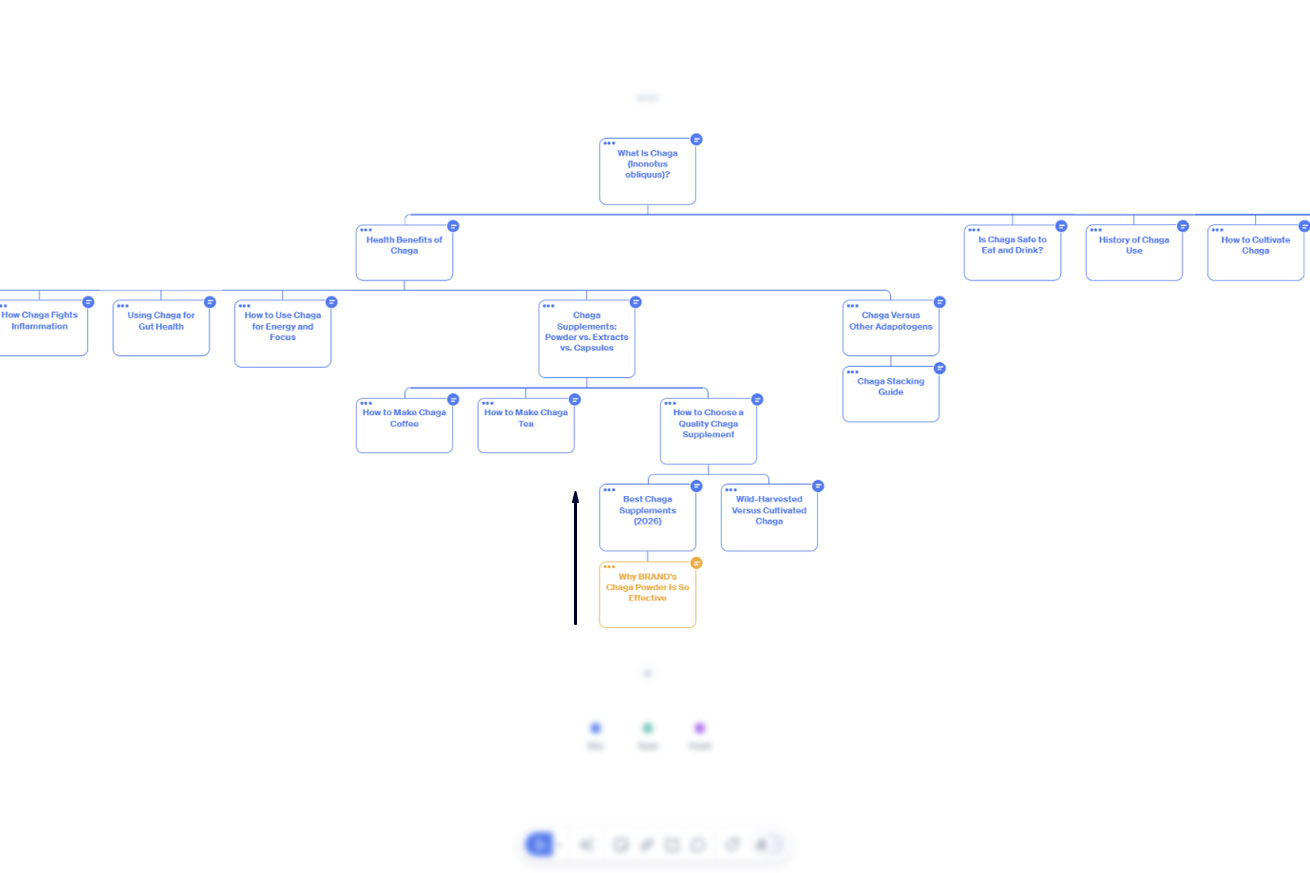
Working upwards along the most product-adjacent, sales-focused branch – which, incidentally, should also contain the easiest topics to write – will almost certainly deliver results faster than, say, starting from ‘How to Cultivate Chaga’. Because of that product proximity, these content assets are also ideal for supporting other marketing channels, like socials, email, and even in-store sales.
Now, I said ‘working upwards’, which might seem a little illogical. (After all, roots and branches come before leaves.) The reality, though, is that content clusters are extremely difficult to write root-first. Your pillar asset will cover a whole topic comprehensively, which means you need to research a lot of different sub-topics to deliver a single asset – unless, of course, you’ve already conducted that research because you started specific and worked inwards.
Highly specific sub-topics also tend to be less competitive in search; you stand a good chance of ranking for them with low topical authority, which means you’ll get results as you go. The alternative is to create assets for broad, very competitive keywords and see almost no results until you finish building your cluster – and, in my experience, most content programs get killed well before that point as stakeholders start to lose patience.
Go to the Root or Fill Out the Branch?
When you work up a branch that has multiple sub-branches (twigs?) and leaves, I suggest creating the content assets for everything below the point you’ve worked up to before moving further up the branch. That will ensure you’re supporting each article fully, which will become more important as you target increasingly competitive search terms.
3. Create Your Content Assets
A content cluster will only deliver results if its assets are kernel content – that is, they exceed a minimum quality baseline. All content you create should:
- be technically competent
- have some original element not found elsewhere on the channel in question
- add value for the consumer by educating, entertaining and/or inspiring them
- move consumers further along in their buying journeys.
In the vast majority of circumstances, synthetic content – AI slop – will not meet those 4 requirements. The internet is rife with examples of brands lazily generating synthetic clusters and being punished by Google. (The typical pattern is ‘rank and tank’, where the offending site sees a visibility boost for a few months, then crashes and burns somewhere between the 3- and 6-month mark.) Given Google’s recent updates and the availability of watermarking systems like SynthID, it’s likely this penalisation will continue to intensify.
Instead, I’d strongly encourage you to build your clusters the old-fashioned way: good, clear writing, deep subject matter research, and, where possible, original reporting of some kind. (You don’t have to run a double-blind study to be original, either. Sharing your personal experiences meets that criteria and supports EEAT.)
4. Interlink Your Assets
A key component of any content cluster – textual or otherwise – is a high degree of interconnection. Assets should reference and link to each other to facilitate an easy flow of user interaction. The less friction, the better.
One option is to have a navigational hub that makes it easy to see all assets in the cluster. iPullRank’s AI Search Manual and Backlinko’s SEO Marketing Hub are both great examples. The key to a good hub is to choose a logical classification system – grouping by topic, ordering by progression, and so on. It’s also a good idea to include breadcrumbs in each asset that link back to the hub.
For smaller clusters, you can treat your pillar asset as the hub and simply link out to each child asset from within its body. Adding a ‘More Articles’ section at the bottom of each satellite asset can also be helpful.
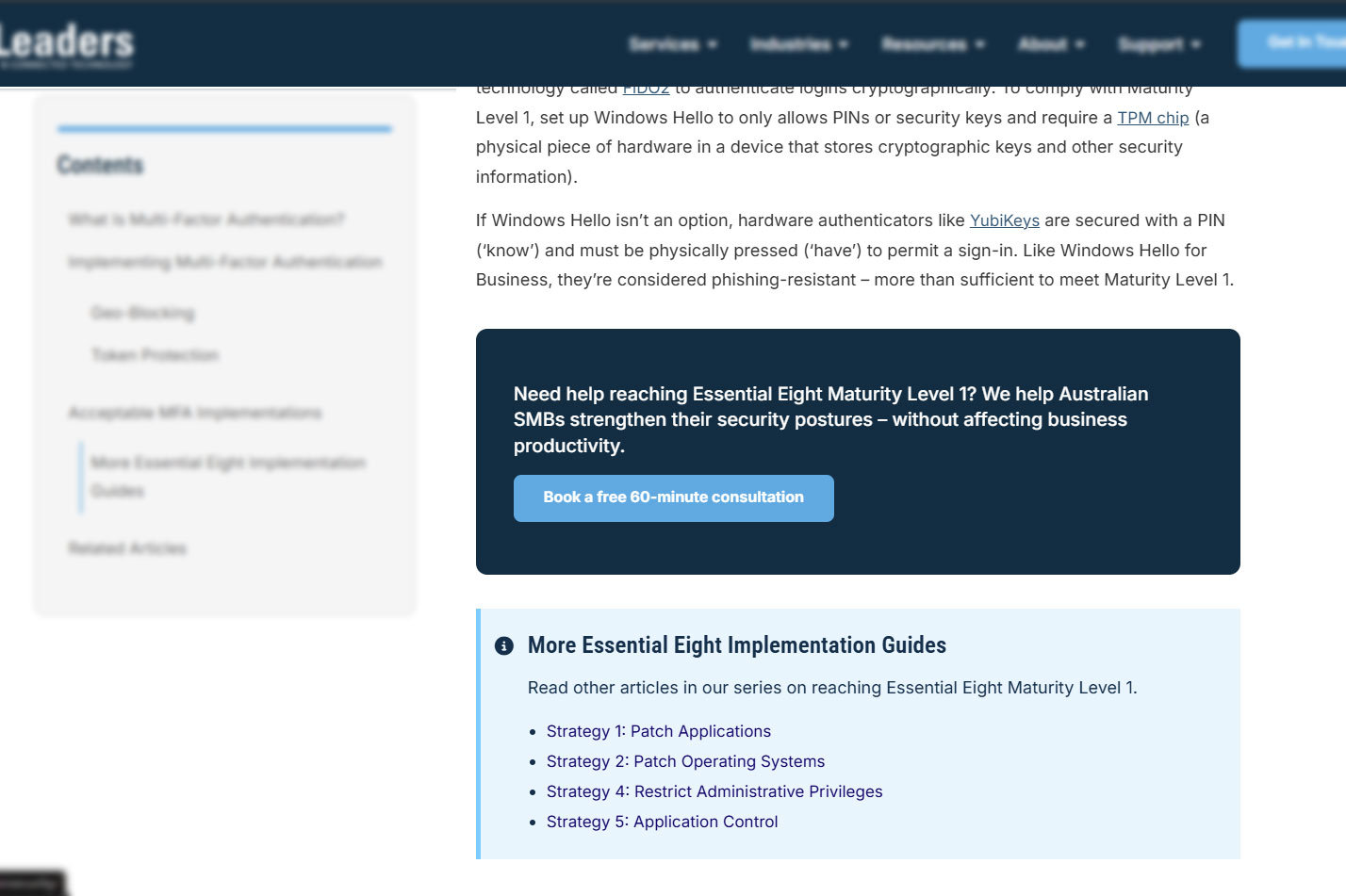
Finally, make sure you include hyperlinks between closely related assets in the cluster, such as parents and children and branch siblings. Those assets will likely be referenced naturally anyway, so it should be fairly simple to add a few links in the appropriate places.
Keep in mind that assets closer to the cluster’s root should have a higher number of internal links. That will help link equity flow properly and make sure the right pages have a high onsiteProminence score.
5. Maintain Your Cluster
I’d be remiss if I didn’t address content hygiene. A content cluster is very rarely composed of time-bound assets like news articles. Instead, it’s designed to cover a given topic comprehensively – and very few topics, other than historical events, remain static and unchanging. That means, to keep your cluster performing at its best, you need to regular review and update your content assets.
Most assets should be reviewed on a rolling 12-month cycle. For topics that change regularly (like AI SEO), you might need to increase that review cadence to 6 or even 3 months. It’s a good idea to track each asset’s next review in your content base and set up automatic tasks or reminders for upcoming reviews.
When you review an asset, assess factors like current organic search performance, non-search utilisation (that is, how is the asset being used by Sales or in other marketing channels?), informational gaps, and on-page engagement.
Next Steps
If you’re an SEO or content practitioner, this guide should contain all the information you need to start building your own clusters.
Conversely, if you’re a business owner or marketing leader, you probably don’t have dozens of hours to expend on technically demanding writing. Instead, share this guide with your SEO agency – or, if you don’t have one, get in touch with us for a complimentary consultation.